

What is my Palo Alto Players Account?
How do I sign into my account?
On a smartphone, tablet, laptop, or desktop computer, open your web browser, go to my.paplayers.org/LoginLogout then enter your email and password and click the “Log In” button.
LoginI Need a Password? I didn’t even know I had an Account!
That’s right. If you purchased a ticket or made a donation in the last decade, your account is probably set up.
Just set your password to see what you’ve been up to at Palo Alto Players. Visit Password Reset and unlock everything your account has to offer!
Reset PasswordStep 1
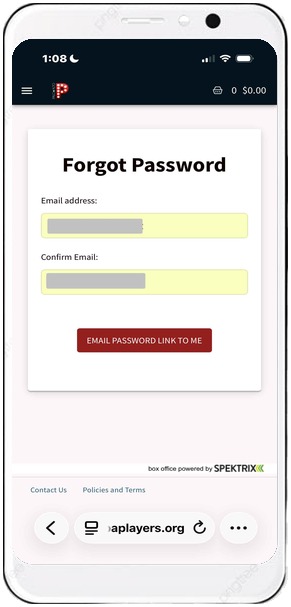
- Scroll to “Forgot your password” at the bottom of the Login page and click Reset here.
- Enter your email address at both prompt boxes.
- Click “Email Password Link To Me”.
- Keep an eye on your inbox for a verification email titled “New Password” from [email protected]. Check your spam folder if it doesn’t appear.
Step 2
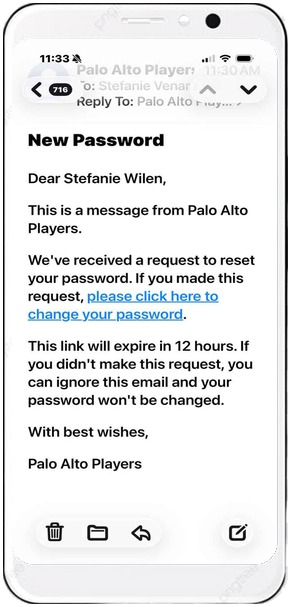
- Open the email from [email protected] titled “New Password” within 12 hours and click “please click here to change your password.”
Step 3
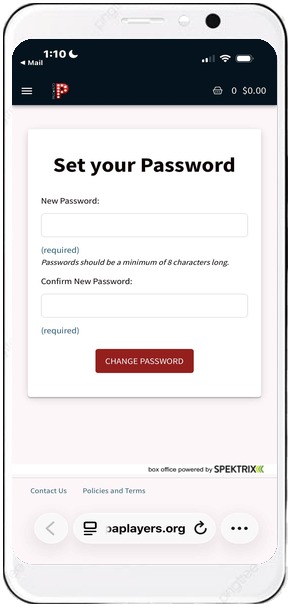
- Create a strong password. Re-enter it in the 2nd prompt box.
- Click “Change Password”. Use your email and new password to login.
Where Do I Find My Digital Tickets?
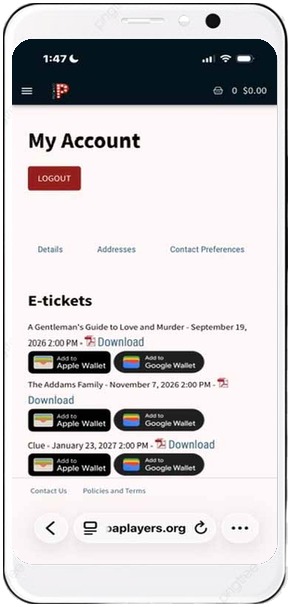
You will receive an automatic email immediately after purchase with your digital tickets. Check for “Your Palo Alto Players tickets are ready” from [email protected]”.
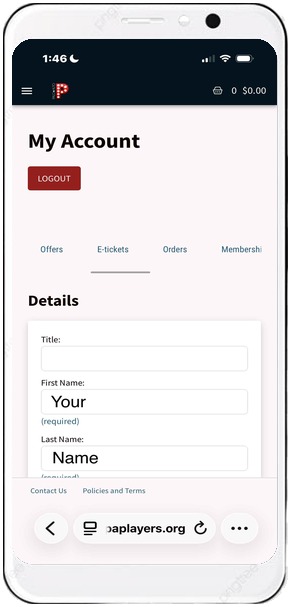
Access your tickets at any time by logging into your account.
Click on “E-tickets”. You can load tickets into your phone’s e-wallet or download a scannable .pdf.
You can also find all upcoming and past tickets at “Orders”—whether you chose the convenience of digital tickets on your smartphone or the classic will-call window pickup option.